AI photo editing has become one of the biggest trends on social media. From cinematic portraits to devotional images, artificial intelligence now makes it possible to transform ordinary photos into creative and highly detailed visuals. One of the latest creative trends is creating Jagannath Ji AI Photos using ChatGPT.
With the right prompt, you can transform your regular photo into a beautiful devotional scene featuring Lord Jagannath Ji, a majestic temple, dramatic clouds, golden lighting and a cinematic spiritual atmosphere.
In this guide, we will explain how to create a stunning Jagannath Ji AI Photo with ChatGPT using a simple step-by-step process and a powerful AI photo editing prompt.
What Is Jagannath Ji AI Photo Editing?
Jagannath Ji AI Photo Editing is a creative image editing technique where artificial intelligence transforms your original photo into a devotional and cinematic scene.
You can add elements such as:
- Lord Jagannath Ji
- Jagannath Temple
- Divine golden lighting
- Dramatic clouds
- Spiritual atmosphere
- Cinematic backgrounds
- Realistic temple architecture
The best part is that you can use your own photo as the main subject while creating a completely new background and atmosphere.
How to Create a Jagannath Ji AI Photo with ChatGPT
Creating this type of AI photo is very simple. You only need a clear photo and a detailed prompt.
Step 1: Upload Your Photo
First, open ChatGPT and upload the photo that you want to edit.
For the best result, use a clear, high-quality image. A photo with good lighting and a clearly visible subject usually produces better AI editing results.
Step 2: Add a Detailed AI Prompt
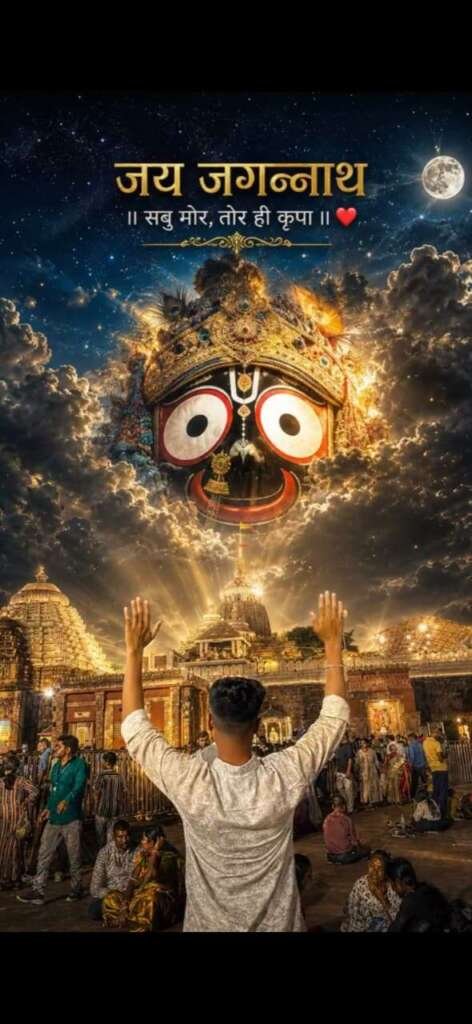
Use the following Jagannath Ji AI Photo Editing Prompt:
How to Keep Your Original Face in the AI Image
One of the most important things in AI photo editing is preserving the original face. Sometimes AI tools may unintentionally change facial features during image generation.
To reduce this problem, always include clear instructions such as:
“Keep the person’s original face and identity exactly the same. Do not change the facial features, eyes, nose, lips, skin tone, age or facial structure.”
This helps the AI understand that the person in the uploaded photo should remain the same.
However, AI image generation can sometimes produce slightly different results, so you may need to adjust the prompt and generate the image again.
How to Make Your AI Photo More Cinematic
If you want your Jagannath Ji AI image to look more dramatic and professional, add cinematic details to your prompt.
You can include:
- Golden hour lighting
- Dramatic clouds
- Divine light rays
- Ultra-realistic temple architecture
- Cinematic composition
- Professional DSLR photography
- 4K realistic details
- Natural skin texture
- Spiritual atmosphere
- Realistic shadows
These details can help create a more attractive and visually powerful image.
Best Tips for Creating Realistic AI Photos
The quality of your original photo plays an important role in the final result. Always try to use a clear and high-resolution image.
For better results:
- Use a well-lit photo
- Avoid extremely blurry images
- Make sure the subject is clearly visible
- Give detailed instructions in the prompt
- Mention that the original identity must be preserved
- Describe the lighting and background clearly
- Avoid adding too many unnecessary elements
A detailed prompt usually gives the AI a better understanding of your desired result.
Where Can You Use a Jagannath Ji AI Photo?
After creating your AI image, you can use it for several creative purposes, including:
- Instagram posts
- Facebook posts
- WhatsApp profile pictures
- YouTube thumbnails
- Devotional status updates
- Festival posts
- Instagram Stories
- Personal creative projects
You can also create different versions of the same image by changing the background, lighting, temple scene or clothing style.
Conclusion
Creating a Jagannath Ji AI Photo with ChatGPT is a simple and creative way to transform an ordinary photo into a stunning devotional image. By uploading your photo and using a detailed AI editing prompt, you can create a cinematic scene featuring Lord Jagannath Ji, beautiful temple architecture, dramatic clouds and divine lighting.
The prompt shared in this article can help you create your own viral-style Jagannath Ji AI Photo. If the first result is not perfect, you can make small changes to the prompt and generate the image again.
With a clear photo and the right instructions, anyone can create a beautiful and realistic devotional AI image using ChatGPT.
जय माता दी इस साल भी बेडवास धाऊजी की बावड़ी गांव में गवरी ली जारी है
badmash_tarun_rj27